To-do lists are essential tools for managing tasks and achieving goals. From simple daily chores to complex projects, a well-structured to-do list can streamline your workflow and enhance productivity. This guide delves into the various aspects of to-do list usage, providing actionable strategies for maximizing their effectiveness.
This comprehensive resource covers everything from the fundamentals of creating a to-do list to advanced techniques for managing multiple tasks and projects. We’ll explore different types of lists, discuss their benefits, and provide practical examples for implementing them in your daily life. Whether you’re a seasoned organizer or just starting your journey with to-do lists, this guide offers valuable insights and techniques to improve your productivity and reduce stress.
Introduction to To-Do Lists
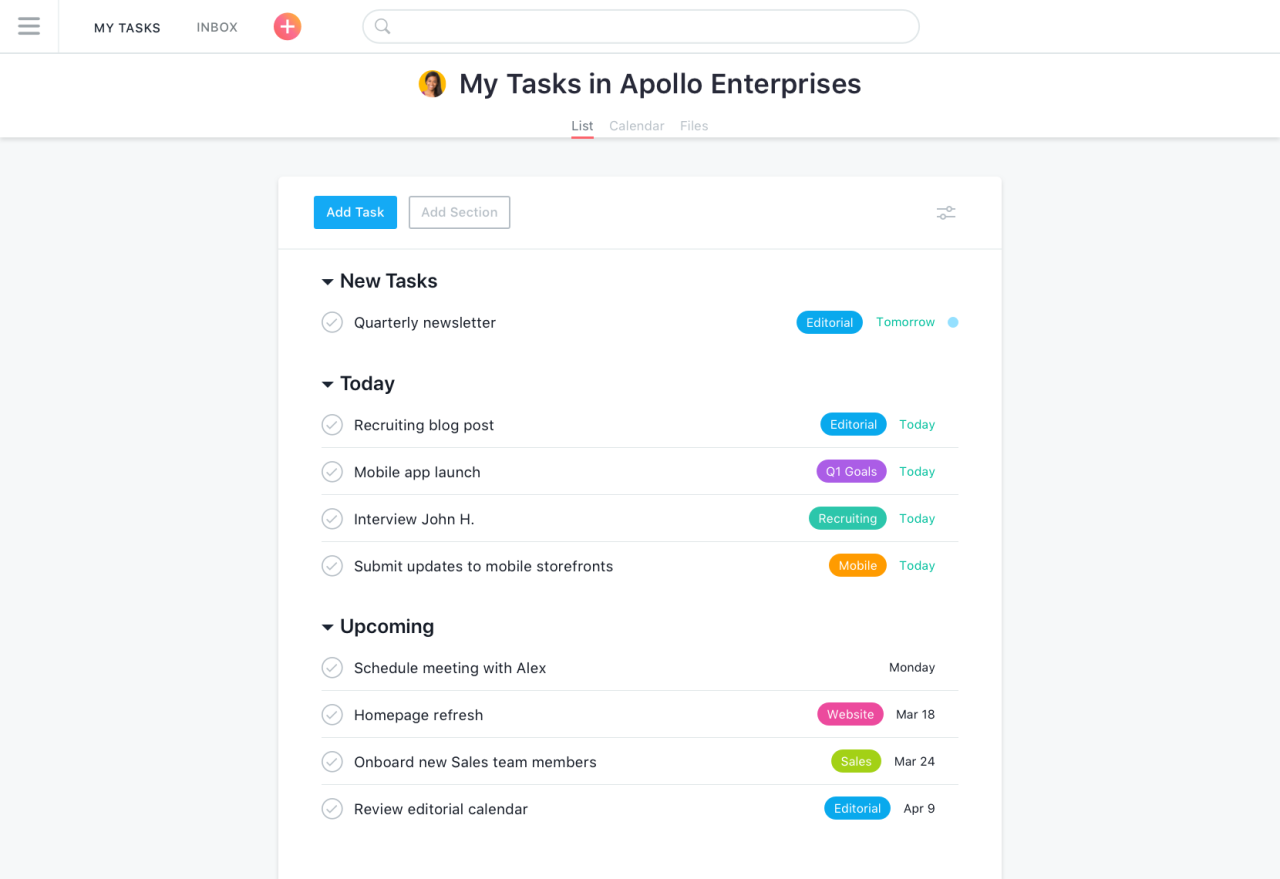
A to-do list is a structured method for organizing tasks and activities. It serves as a central repository for managing responsibilities, ensuring nothing falls through the cracks, and promoting productivity. By recording tasks and assigning due dates, individuals can effectively track progress and manage time more efficiently.The fundamental purpose of a to-do list is to provide a clear and concise plan of action.
It helps individuals prioritize tasks, allocate appropriate time for each, and maintain focus on achieving desired outcomes. This structured approach minimizes mental clutter, fostering a sense of control and accomplishment.
Types of To-Do Lists
Different types of to-do lists cater to various needs and organizational styles. Simple lists can be used for daily tasks, while more detailed lists are useful for complex projects. Project-based to-do lists, for instance, allow for a granular breakdown of tasks involved in a larger undertaking.
- Simple To-Do Lists: These are straightforward lists of tasks to be completed. They are ideal for managing daily chores, errands, and quick tasks. Their simplicity makes them easily adaptable and accessible.
- Detailed To-Do Lists: These lists include detailed descriptions of tasks, deadlines, and assigned responsibilities. They are beneficial for larger projects that require a structured approach. Detailed lists help ensure every aspect of a project is accounted for.
- Project-Based To-Do Lists: These lists are tailored to specific projects. They break down complex projects into smaller, manageable tasks, ensuring all elements are addressed and tracked throughout the project lifecycle. This approach provides a clear overview of project progress.
Basic To-Do List Structure
A simple to-do list often utilizes a tabular format to clearly display tasks, deadlines, and completion status. This structured approach allows for easy monitoring and prioritization of tasks.
| Task | Due Date | Status |
|---|---|---|
| Grocery Shopping | October 26, 2024 | Incomplete |
| Pay Bills | October 27, 2024 | Incomplete |
| Book Doctor Appointment | October 28, 2024 | Incomplete |
This basic table structure provides a clear overview of pending tasks, their deadlines, and current status. Using a consistent format enhances the usability and effectiveness of the to-do list.
Benefits of Using a To-Do List
A well-structured to-do list can be a powerful tool for enhancing daily routines, improving productivity, and managing time effectively. By systematically organizing tasks, individuals can gain a clearer understanding of their responsibilities and prioritize activities accordingly. This clarity fosters a sense of control and reduces the overwhelming feeling often associated with unmanaged workloads.To-do lists provide a framework for planning and execution, leading to more efficient use of time and ultimately increased productivity.
By visualizing tasks and deadlines, individuals can better allocate their time and energy, preventing procrastination and ensuring timely completion of projects. This structured approach allows for a more balanced and less stressful work environment.
Enhancing Productivity and Time Management
To-do lists provide a clear overview of tasks and deadlines, making it easier to allocate time and prioritize activities effectively. This structured approach promotes focus and prevents the mental clutter that can lead to wasted time and decreased productivity. By breaking down large projects into smaller, manageable tasks, individuals can track progress more easily and maintain motivation. The sense of accomplishment derived from completing tasks on the list further fuels motivation and productivity.
For example, a project manager using a to-do list can break down a complex project into smaller, more manageable tasks, each with a specific deadline, allowing for a clear visual representation of progress and enabling better time allocation.
Comparing To-Do List Effectiveness with Other Methods
While other task management methods exist, such as mental note-taking or simply relying on memory, to-do lists offer a tangible and readily accessible record of tasks. This tangible record allows for better tracking of progress, easier delegation, and a clear overview of outstanding commitments. Compared to relying solely on memory, to-do lists reduce the risk of forgetting tasks, misplacing priorities, or overlooking important deadlines.
For instance, a student using a to-do list to manage their studies can easily track assignments, deadlines, and exam preparations, ensuring they stay on top of their academic commitments.
Reducing Stress and Improving Focus
By creating a structured plan, to-do lists reduce the feeling of being overwhelmed by a large number of tasks. This reduction in mental load frees up cognitive resources, leading to improved focus and concentration. Breaking down complex tasks into smaller, more manageable steps also helps prevent feelings of anxiety and stress associated with large, daunting projects. For example, a person facing a major home renovation project can use a to-do list to break down the project into smaller, more manageable tasks like scheduling electrical work, selecting materials, and coordinating contractors.
This structured approach allows for better time management, reduced stress, and improved focus on each individual task.
Promoting a Sense of Accomplishment
The act of crossing off tasks from a to-do list provides a tangible sense of accomplishment. This accomplishment reinforces positive habits and motivates individuals to continue working toward their goals. Each completed task represents progress, fostering a cycle of motivation and achievement. For example, a freelancer using a to-do list to manage their client projects can experience a sense of accomplishment as they complete each project, leading to improved motivation and potentially higher client satisfaction.
Different To-Do List Methods
| Method | Pros | Cons |
|---|---|---|
| Paper | Tangible, easily accessible, and low-tech. Often encourages a sense of physical accomplishment. | Can be cumbersome to carry around, difficult to search, and prone to loss or damage. Difficult to share or collaborate on. |
| Digital (e.g., apps, software) | Easy to search, share, and collaborate. Often offers reminders, task categorization, and prioritization tools. | Requires access to a device, susceptible to technical issues (e.g., device failure, internet outages), and can be overwhelming with too many features. |
The table above highlights the advantages and disadvantages of paper-based and digital to-do list methods. The choice of method depends on individual preferences, needs, and the specific context of the tasks being managed. Choosing the appropriate method ensures effective task management and optimizes efficiency.
Creating an Effective To-Do List
A well-structured to-do list is a powerful tool for managing tasks and achieving goals. Creating a list that truly works for you requires a deliberate approach, going beyond simply jotting down items. This section will explore the key steps in constructing an effective to-do list, including prioritizing tasks, breaking down large projects, setting realistic deadlines, and using clear language.A robust to-do list isn’t just a repository of tasks; it’s a dynamic system that adapts to your needs and helps you stay on track.
By understanding how to create a well-organized list, you can maximize its effectiveness and significantly improve your productivity.
Prioritizing Tasks
Prioritization is crucial for focusing your energy on the most important tasks first. It ensures you’re making progress on the activities that will have the greatest impact. Without prioritization, you risk becoming overwhelmed by a long list of tasks, potentially leading to procrastination and missed deadlines.
- Importance and Urgency Matrix: A common method for prioritizing tasks involves assessing their importance and urgency. Tasks that are both important and urgent should be tackled immediately. Important but not urgent tasks should be scheduled for later, while less important but urgent tasks might be delegated or rescheduled.
- Impact and Effort Analysis: Evaluate the potential impact of each task on your overall goals. High-impact tasks that require significant effort should be prioritized. This ensures you dedicate time and energy to activities that will yield the greatest returns.
- Due Dates: Consider deadlines when prioritizing. Tasks with approaching deadlines should be given higher priority than those with flexible due dates. This approach ensures timely completion of critical items.
Breaking Down Large Tasks
Large tasks can feel daunting, often leading to procrastination. Breaking them into smaller, manageable sub-tasks can make the overall project seem less overwhelming and more achievable.
- Decomposition: Divide the large task into smaller, concrete steps. Each step should be clearly defined and focused, facilitating progress.
- Example: Instead of “Write a report,” break it down into “Research topic,” “Artikel report,” “Write introduction,” “Write body paragraphs,” “Write conclusion,” and “Edit report.”
Setting Realistic Deadlines and Time Estimations
Realistic deadlines and time estimations are essential for avoiding burnout and ensuring successful task completion. Overly ambitious deadlines can lead to stress and reduced quality of work.
- Time Blocking: Allocate specific time slots for each task. This helps in managing time effectively and prevents tasks from spilling over into other time commitments.
- Experience-Based Estimates: If possible, use past experience to estimate how long similar tasks took in the past. This allows for more accurate time predictions.
- Buffer Time: Include buffer time for unexpected delays or unforeseen circumstances. This helps in maintaining a flexible schedule and avoiding last-minute rushes.
Using Clear and Concise Language
Clear and concise language in your to-do list prevents misinterpretations and ensures everyone (if applicable) understands the task requirements. Ambiguous or overly complex language can lead to errors and wasted time.
- Specificity: Use precise language to clearly define what needs to be done. Avoid vague or open-ended descriptions.
- Example: “Send email to client about proposal” is better than “Follow up with client.”
Task Prioritization Methods
This table illustrates various task prioritization methods:
| Method | Description | Example |
|---|---|---|
| Eisenhower Matrix | Prioritizes tasks based on urgency and importance. | Urgent & Important: Respond to client’s email; Important & Not Urgent: Plan next quarter’s strategy; Not Urgent & Not Important: Organize desk |
| MoSCoW Method | Prioritizes tasks based on their importance to the project. | Must have: Final report; Should have: Client presentation; Could have: Extra charts; Won’t have: Extra slides for presentation |
| Value vs. Effort | Prioritizes tasks based on their value and the effort required to complete them. | High Value & High Effort: Develop new marketing strategy; High Value & Low Effort: Update social media posts |
Implementing and Managing a To-Do List
A well-structured to-do list is only effective when consistently implemented and managed. This involves developing strategies for consistent use, maintaining motivation, adapting to unforeseen circumstances, and regularly reviewing and updating the list. By implementing these strategies, individuals can maximize the benefits of their to-do lists and achieve their goals efficiently.Implementing a to-do list is more than just writing tasks down.
It requires a proactive approach to managing your time and priorities. Consistency is key to building effective habits and reaping the rewards of a well-managed to-do list. Proactive management includes regular review and adjustments, ensuring that the list remains relevant and useful.
Strategies for Consistent Use
Developing consistent habits is crucial for utilizing to-do lists effectively. This involves integrating the to-do list into daily routines and establishing clear expectations for its use. A well-defined process for adding tasks, prioritizing them, and completing them creates a structured framework.
- Establish a dedicated time slot: Allocate a specific time each day or week for reviewing and updating your to-do list. This creates a routine, making it easier to incorporate list management into your daily schedule. Consistency is key to building a habit. For example, setting aside 15 minutes every morning to review and update the list can lead to significant improvements in productivity.
- Link to existing routines: Integrate to-do list management into existing routines. For example, review the list while waiting for the coffee to brew or during a short break at work. By connecting the list to existing activities, you increase the likelihood of its consistent use.
- Use reminders and notifications: Utilize technology to set reminders for specific tasks or deadlines. This ensures you don’t miss important items and maintain focus. Consider using a to-do list app or a digital calendar for reminders and notifications.
Maintaining Motivation and Avoiding Procrastination
Motivation is vital for successfully implementing and managing a to-do list. Techniques to maintain motivation and avoid procrastination can be beneficial.
- Break down large tasks: Dividing overwhelming tasks into smaller, more manageable sub-tasks can make them seem less daunting and increase motivation. This approach reduces the perceived workload and fosters a sense of accomplishment with each sub-task completion.
- Reward yourself: Establish a system of rewards for completing tasks. This could involve a small treat, a short break, or a non-work activity. Rewards can significantly boost motivation and create positive reinforcement.
- Visualize success: Envision the positive outcomes of completing tasks. Visualizing success can help maintain motivation and overcome procrastination. For example, imagine the feeling of satisfaction after completing a major project.
Adjusting to Unforeseen Circumstances
To-do lists should be adaptable to unexpected events or changes in priorities. This adaptability ensures the list remains a valuable tool.
- Flexibility and prioritization: Identify the most crucial tasks and re-prioritize the list based on new information. Flexibility is essential for handling unforeseen circumstances effectively.
- Delegation: If possible, delegate tasks to others to manage the workload and free up time. Delegation can reduce stress and ensure important tasks are still addressed.
- Re-evaluation and re-planning: Regularly review and re-plan the to-do list to account for changes in circumstances. This ensures that the list remains aligned with current priorities.
Reviewing and Updating To-Do Lists
Regular review and updating are essential for maintaining a useful and effective to-do list.
- Regular review frequency: The frequency of reviews depends on individual needs and the complexity of tasks. Daily, weekly, or monthly reviews can be effective depending on the situation. For example, a daily review might be beneficial for projects with many smaller tasks, while a weekly review might be sufficient for larger projects.
Examples of Review Schedules
Different review schedules can be tailored to individual needs and the nature of the tasks.
| Review Schedule | Suitable for |
|---|---|
| Daily | Projects with many smaller tasks, urgent deadlines |
| Weekly | Larger projects, ongoing tasks |
| Monthly | Projects with longer timelines, strategic goals |
Managing Multiple To-Do Lists
Managing multiple to-do lists requires organization and prioritization.
- Categorization: Categorize tasks based on project, category, or priority. This approach facilitates efficient organization and retrieval.
- Separate lists for different areas: Maintain separate to-do lists for different aspects of life (work, personal, household). This keeps each list focused and manageable.
- Cross-referencing: Utilize cross-referencing between different to-do lists to ensure consistency and avoid duplication.
Utilizing Different To-Do List Formats

To-do lists are powerful tools for organization, but their effectiveness hinges on selecting the right format. Different formats cater to various needs and personalities, making it crucial to understand their strengths and weaknesses. This section explores several common formats and how they can be tailored for optimal results.
Different To-Do List Formats
Various formats are available for organizing tasks, each with unique advantages and disadvantages. Choosing the right format enhances productivity and ensures tasks are managed effectively. The selection process should consider the complexity of tasks and the user’s preferred method of organization.
- Bullet Points: A simple and flexible format, ideal for quickly jotting down tasks. Bullet points are excellent for capturing ideas on the fly and creating a preliminary list. They lack structure and can be overwhelming for lengthy projects, potentially leading to disorganized efforts.
- Numbered Lists: Ordered lists provide a structured approach, especially helpful for sequential tasks or steps in a process. This format promotes clarity and ensures each step is addressed in the correct order. However, flexibility might be reduced if tasks need to be rearranged or added in the middle.
- Checkboxes: Checkboxes provide a visual representation of completed tasks, promoting a sense of accomplishment and progress. This format is suitable for projects with clearly defined steps and allows for a visual tracking of progress. It may not be ideal for tasks that don’t have discrete steps or for situations where a sense of accomplishment isn’t crucial.
Examples of Different Formats in Use
Understanding how different formats can be utilized in various scenarios is key to selecting the most effective approach. For instance, a simple grocery list might use bullet points to jot down items quickly, while a project plan might employ numbered lists to ensure steps are executed sequentially.
- Example 1: For a grocery list, bullet points are sufficient. (e.g.,
-Milk*,
-Eggs*,
-Bread*). The focus is on capturing items rather than strict ordering. - Example 2: For a recipe, numbered lists are ideal. (e.g., 1. Preheat oven to 350°F, 2. Mix ingredients, 3. Bake for 30 minutes).
This format ensures steps are executed in the correct order.
- Example 3: For a daily task list, checkboxes can be beneficial. (e.g., [ ] Complete report, [ ] Respond to emails, [ ] Schedule meeting). This allows for a clear visual representation of completed tasks and progress.
Comparison Table of To-Do List Formats
The table below compares different formats, considering their suitability for various tasks.
| Format | Advantages | Disadvantages | Suitable Tasks |
|---|---|---|---|
| Bullet Points | Flexible, quick to create | Lack of structure, can become overwhelming for complex tasks | Grocery lists, quick brainstorming sessions |
| Numbered Lists | Structured, ensures steps are followed | Less flexible, difficult to rearrange tasks | Projects with sequential steps, recipes |
| Checkboxes | Visual progress tracking, sense of accomplishment | Not ideal for tasks without discrete steps | Daily routines, projects with clear milestones |
Creating a Personalized To-Do List Template
Tailoring a to-do list template to individual preferences enhances its effectiveness. Consider incorporating elements like deadlines, priorities, and task categorization to create a customized structure that best supports your workflow. By adapting the template to specific needs, the list becomes a more effective tool for managing tasks.
- Step 1: Identify key elements: Determine the key aspects that need to be tracked (e.g., task description, due date, priority level, assigned person).
- Step 2: Select format: Choose a format (e.g., bullet points, numbered lists, checkboxes) based on your needs and preferred method of organization.
- Step 3: Customize fields: Add columns or rows for additional information like deadlines, task dependencies, or assigned personnel.
Integrating To-Do Lists with Other Tools
Enhancing productivity often involves streamlining workflows by connecting to-do lists with other applications. This integration allows for a more holistic approach to task management, seamlessly linking tasks with schedules, projects, and other crucial elements of your daily or professional life. This integration can significantly boost efficiency by eliminating the need to switch between multiple platforms.By integrating your to-do lists with other tools, you can centralize your task management, track progress more effectively, and ultimately achieve your goals more efficiently.
This integration can be crucial for both personal and professional use cases.
Connecting To-Do Lists with Calendars
Connecting to-do lists with calendars allows for a clear visualization of deadlines and scheduling. This helps ensure that tasks are completed within the allocated timeframe. For example, you can schedule specific to-do list items within your calendar, setting reminders and notifications to prompt action. This synchronization enables a comprehensive overview of your commitments, helping you avoid over-scheduling and maintain a balanced schedule.
Furthermore, you can view your calendar alongside your to-do list, facilitating a clear picture of your daily, weekly, or monthly schedule.
Integrating with Project Management Software
Project management software often incorporates task management features. Integrating to-do lists with such software enables a streamlined workflow for project-based tasks. This allows for seamless tracking of progress, allocation of tasks, and assignment of responsibilities. For example, a project management tool like Asana or Trello can receive tasks directly from a to-do list application, allowing for team collaboration and progress updates.
This integration facilitates efficient task delegation and enhances project visibility.
Syncing To-Do Lists Across Devices
Synchronization across devices is vital for maintaining a consistent to-do list experience regardless of location. Cloud-based to-do list applications often allow for seamless synchronization, ensuring that your list is accessible on your phone, tablet, and computer. This feature is crucial for on-the-go task management, providing flexibility and continuity in your work or personal activities.
Automating Tasks Based on To-Do List Entries
Automation significantly streamlines workflow by automating tasks based on to-do list entries. For example, if you have a task to “send a thank-you email,” the to-do list app can automatically schedule the email to be sent at a specific time or after a certain period. This automated task feature can save time and reduce manual intervention. Furthermore, some applications allow for integration with other services, such as email platforms, to automate email sending and responses based on to-do list items.
Data Security in Digital To-Do Lists
Ensuring data security is paramount when using digital to-do lists, especially if they store sensitive information. Choose platforms with robust security measures, such as encryption and two-factor authentication, to protect your data from unauthorized access. Furthermore, be mindful of the data sharing policies of the platform to prevent potential breaches. Regularly review your to-do list application’s security policies to stay updated on security protocols.
Reminders and Notifications in To-Do List Applications
Reminders and notifications in to-do list applications are essential for staying on track with deadlines. These features can provide timely alerts, prompting action when tasks are due or nearing deadlines. Different notification methods, such as email, SMS, or in-app alerts, cater to individual preferences. The customization options for reminders and notifications are crucial for ensuring that tasks are completed effectively and on time.
Table: To-Do List Integrations
| Tool | Integration Type | Example |
|---|---|---|
| Google Calendar | Scheduling and Reminders | Scheduling a meeting based on a to-do list item, receiving a notification for upcoming deadlines. |
| Asana/Trello | Project Management | Adding project tasks from a to-do list, assigning tasks to team members, tracking progress. |
| Evernote/OneNote | Note-Taking/Task Management | Linking to-do list items with notes, adding relevant context, and creating interconnected task management. |
| Email Clients | Task Automation | Automating the sending of emails based on the completion of a to-do list item. |
Overcoming Common Challenges
To-do lists are a powerful tool, but they can be challenging to implement consistently. Understanding the common obstacles and developing strategies to overcome them is crucial for maximizing their effectiveness. This section will explore common challenges and provide practical solutions.Many individuals struggle to maintain consistent use of to-do lists. This is often due to a combination of factors, such as procrastination, feeling overwhelmed, or difficulty adapting the list to individual work or personal styles.
This section will address these obstacles and present strategies for successful to-do list management.
Procrastination and Staying Focused
Procrastination is a frequent obstacle to effective to-do list use. Strategies for overcoming procrastination often involve breaking down large tasks into smaller, more manageable steps. This process makes the task less daunting and increases the likelihood of starting and completing it. Time management techniques, such as the Pomodoro Technique, can also be very helpful. The Pomodoro Technique involves working in focused intervals (e.g., 25 minutes) followed by short breaks.
This structured approach helps maintain focus and prevents burnout.
Handling Overwhelming Lists of Tasks
Overwhelmed by a long to-do list? Prioritization is key. Techniques such as the Eisenhower Matrix (urgent/important) or the Pareto Principle (80/20 rule) can help. The Eisenhower Matrix helps categorize tasks based on urgency and importance, allowing you to focus on high-priority items first. The Pareto Principle suggests that 80% of your results often come from 20% of your efforts, so identifying those 20% of tasks that will yield the most significant impact can help.
Breaking down large tasks into smaller sub-tasks can also make an overwhelming list feel more manageable. This approach involves decomposing a complex task into several smaller, more easily digestible steps.
Adapting to Different Work or Personal Styles
Different individuals have different work and personal styles. To-do lists should be adaptable to these styles. For example, visual learners may benefit from using visual to-do list formats, while auditory learners might find spoken to-do list applications helpful. Personal preferences for different list types (e.g., bullet points, numbered lists, checkboxes) should be considered. Some individuals might prefer digital to-do lists, others may favor handwritten ones.
The most important thing is to choose a method that works for you.
Prioritizing and Adjusting to-do Lists When Tasks Take Longer
Tasks often take longer than anticipated. To-do lists need to be flexible. When a task takes longer than planned, it is important to re-evaluate and adjust the list accordingly. This may involve re-prioritizing tasks or adding buffer time to future entries. Flexibility is essential to adapt to unexpected delays or changes in circumstances.
Having a realistic timeframe for tasks is essential for avoiding frustration and maintaining productivity.
Examples of Overcoming Specific Challenges with To-do Lists
A common challenge is the feeling of being overwhelmed. For example, a student might feel overwhelmed by a large assignment due date. Breaking down the assignment into smaller sub-tasks, such as researching, outlining, drafting, and editing, makes the task less intimidating and more manageable. Another example is procrastination. Someone who procrastinates on a project can use a to-do list to set small, achievable goals.
These small steps can help break the cycle of procrastination and encourage consistent progress.
Advanced To-Do List Techniques

To-do lists, while fundamental, can be enhanced with advanced techniques for optimal productivity and goal achievement. These methods elevate the simple task list to a strategic tool, streamlining workflow and maximizing efficiency. Mastering these techniques can dramatically improve your ability to manage tasks, projects, and overall productivity.Effective prioritization, integration with habit tracking, and strategic goal setting are key elements of maximizing to-do list effectiveness.
Understanding and applying these advanced techniques will enable you to manage your time and resources more efficiently.
Eisenhower Matrix Prioritization
The Eisenhower Matrix, also known as the Urgent-Important matrix, is a powerful tool for prioritizing tasks based on urgency and importance. It categorizes tasks into four quadrants: Urgent and Important, Important but Not Urgent, Urgent but Not Important, and Neither Urgent nor Important. This framework allows you to focus on high-impact tasks and delegate or eliminate less crucial ones.
- Urgent and Important: These are crisis situations, deadlines, and critical issues that require immediate attention. Examples include a critical project deadline, an unexpected client emergency, or a serious problem needing immediate resolution.
- Important but Not Urgent: These are tasks that contribute to long-term goals and success, but don’t require immediate action. Examples include relationship building, strategic planning, and professional development.
- Urgent but Not Important: These are often interruptions, distractions, and time-wasters. Examples include irrelevant phone calls, non-essential meetings, and minor administrative tasks that can be delegated.
- Neither Urgent nor Important: These tasks should be eliminated or delegated. Examples include time-wasting activities, non-essential meetings, and minor tasks that don’t contribute to your goals.
Habit Tracking Integration
Incorporating habit tracking into your to-do list creates a system for consistent improvement and personal development. This method tracks recurring tasks, reinforcing positive behaviors and identifying areas for improvement.
- Establish a dedicated section: Create a dedicated space on your to-do list for habit tracking. This could be a separate column, a section within a specific day, or even a dedicated to-do list for habits.
- Choose habits to track: Select habits you want to cultivate or improve, such as exercising, reading, or learning a new skill. Be specific with your habit, such as “exercise for 30 minutes daily.” Avoid broad goals like “exercise more.”
- Visualize progress: Track each instance of the habit, marking it as complete or incomplete. Visualizing progress helps maintain motivation and provides a clear picture of your consistency.
Goal Setting and Achievement
To-do lists can be used as a foundation for goal achievement. By breaking down larger goals into smaller, manageable tasks, the to-do list becomes a roadmap for success.
- Define clear goals: Clearly articulate your goals. Specific, measurable, achievable, relevant, and time-bound (SMART) goals are ideal for tracking progress. For example, instead of “learn a new skill,” define “learn 3 new programming languages in the next 6 months.”
- Break down goals: Divide your goals into smaller, actionable tasks. This makes the overall goal less daunting and more achievable. For example, to learn a new programming language, you might have tasks like “research the language,” “enroll in a course,” “practice daily coding,” and “build a project.”
- Monitor progress: Regularly review your to-do list and track your progress toward your goals. Adjust your plan as needed to stay on track.
Customizable Templates for Specific Projects
Adapting to-do list templates for specific project needs is crucial for efficient task management. This ensures tasks are prioritized and resources are allocated effectively.
- Project-specific templates: Design unique templates for each project. These templates should include relevant sections for tasks, deadlines, resources, and dependencies.
- Categorization: Organize tasks into logical categories. For example, in a marketing campaign, you could categorize tasks into “content creation,” “social media management,” and “advertising.”
- Resource allocation: Clearly indicate the resources required for each task, such as budget, personnel, or equipment.
Visual Appeal and Aesthetics
Creating visually appealing to-do lists can significantly enhance motivation and engagement. Use color-coding, bullet points, and visual cues to improve readability and clarity.
- Color-coding: Assign colors to different categories or priorities. This allows for quick identification of tasks and improves visual organization.
- Visual cues: Use icons or symbols to represent different types of tasks. For example, a clock icon for time-sensitive tasks or a checklist icon for completed tasks.
- Presentation: Use a template or design tool to make your to-do list visually engaging. Choose a font that is easy to read and a layout that enhances clarity.
Project Management Integration
Integrating project management methods with to-do lists provides a structured approach to managing complex projects. Various methods, like Kanban, Scrum, and Agile, can be adapted for task management.
- Kanban: This method uses visual boards to track tasks through different stages, from “to do” to “in progress” to “completed.” The flexibility of Kanban allows for adapting the process as the project evolves.
- Scrum: This method involves short iterations (sprints) for project development, allowing for flexibility and adaptability. The to-do list can be used to track tasks within each sprint.
- Agile: Agile methodologies emphasize iterative development and continuous improvement. To-do lists can be used to manage and prioritize tasks within each iteration.
Conclusive Thoughts
In conclusion, mastering the art of using a to-do list is a journey of self-improvement and organizational enhancement. By understanding the different types of lists, their advantages, and effective implementation strategies, you can significantly improve your productivity, time management, and stress levels. This guide has provided you with the knowledge and tools to craft and manage effective to-do lists tailored to your specific needs and preferences.
Remember to adapt these techniques to your individual style and priorities to maximize their impact.